Google Business Profile Optimization Checklist
A Google Business Profile optimization checklist with a source for every step. What Google documents, what the industry made up, and what to fix first.

Work through it in this order: claim and verify the profile, set an accurate business name, pick the most specific primary category, get the address or service area right, then fill in services, hours, and photos. Categories are the only field Google says affects your local ranking, so start there.
Most checklists on this topic are a flat list of fifteen things presented as equally important, with no source on any of them. Several of the most popular items are simply not true, and one of them can get your profile suspended.
So this one is built differently. Every step says where the rule comes from, and there is a section at the end on what to ignore.
How to Use This Checklist
Check the evidence tier before you spend money on anything. There are three, and most advice you have read lives in the third.
| Tier | What it means | How we treat it |
|---|---|---|
| Google says so | It is written in Google’s documentation, and we link it | Do it |
| Practitioners believe it | Experienced people observe it; Google has not confirmed it | Reasonable, but never sold as a mechanism |
| Folklore | Repeated everywhere, no primary source, sometimes contradicted | Skip, and see the last section |
Here is the honest headline. Google documents three inputs and no more: relevance, distance, and popularity, a word its own page swaps for prominence halfway down. What each one means, and the hedge attached to them, is unpacked in our guide on where AI and Google actually get their answers about a local business.
The part that matters for a checklist is the test it hands you. If a tactic cannot be traced to one of those three, nobody has shown it works, however confidently it is sold. Google is also blunt that “there’s no way to request or pay for a better local ranking on Google.”
The Google Business Profile Optimization Checklist
Nine steps, in dependency order. Do not skip ahead, because a suspended profile makes every later step pointless.
1. Claim and Verify the Profile
Nothing on your profile is editable until it is verified, so this is step one whether you like it or not.
Google offers several methods: video recording, phone or SMS, email, live video call, postcard, and instant verification through Search Console. Which ones you are offered is Google’s decision, not yours.
What to know before you start:
- Standard verification takes up to 5 business days. That is Google’s stated review window, not a promise.
- Postcards: most codes arrive within 14 days and expire after 30. While you wait, do not request new codes and do not edit your business details.
- Phone verification needs a human to answer. An automated menu will fail it.
Video verification catches the most people out, so read Google’s rules before you record. It must be captured live, unedited, in one take, at least 30 seconds, from a mobile device. Pre-recorded video is rejected. The footage has to show three things: where you operate, proof the business exists, and proof you manage it.
2. Get the Business Name Right
Use your real name. The one on your van, your invoices, and your door.
Google’s guideline is one sentence: “Your name should reflect your business’s real-world name, as used consistently on your storefront, website, stationery, and as known to customers.”
Google lists what is prohibited, with its own examples: taglines, store codes, trademark symbols, all-caps words, opening hours, phone numbers, URLs, and service descriptions.
This is the item where the industry and Google genuinely disagree, so here it is straight. Stuffing your city and your trade into your business name does appear to help rankings. Whitespark’s 2026 Local Search Ranking Factors survey ranks keyword-oriented business titles third among the factors its respondents recognize. Worth knowing what that is: a survey of practitioner opinion, not Google data and not a correlation study. It also violates the guideline above, competitors can report it in about four clicks, and the consequence lands on your profile rather than on the agency that suggested it.
We do not do it for clients, and we would tell you the same if you asked. A tactic that works right up until it costs you the profile is not a tactic, it is a loan.
3. Set Your Categories
This is the strongest field on the profile, and the only one Google directly connects to ranking.
Google states it plainly: “The categories you select affect your local ranking on Google.” No other field on your profile gets a sentence like that. If you only do one thing on this list, do this one.
The rules, and where each comes from:
- Ten slots: one primary, nine additional. The mechanics are in our categories guide.
- Several thousand categories exist, and the list changes constantly. Google publishes no browsable master list and no official count, so you pick by typing and taking the closest match. You cannot invent one.
- Google’s test, from its representation guidelines: “Select categories that complete the statement: ‘This business IS a’ rather than ‘this business HAS a.’”
Now the part that contradicts most checklists. Google’s written instruction on that same page is to “use as few categories as possible to describe your overall core business”, and “do not use categories solely as keywords”. The advice to fill all ten slots for coverage is the opposite of Google’s stated rule.
Choose the narrowest category Google’s list offers for the work that pays your bills, then add others only for genuinely separate service lines. Our guide on how to change your Google Business Profile categories covers the exact clicks and how to choose between close matches.
Categories also unlock features rather than just relevance. Google notes that hotels can show class ratings, food businesses can add ordering and reservation links, and health and beauty businesses can add a booking button. The wrong category can quietly cost you a button you did not know existed.
4. Address or Service Area
Get this wrong and you are not optimizing a profile, you are risking one.
If customers come to you, show your address. If you travel to customers, you are a service-area business and Google requires you to hide it: “If you’re a service-area business, you should hide your business address from customers.” If you do both, you are hybrid: show the address and set service areas too.
Google’s hard limits on service areas:
- Up to 20 service areas. No more.
- No radius. “You can’t set your service area as a radius distance around your business.” Cities, postal codes, or regions only.
- About two hours of driving time, maximum, for the outer boundary of the whole area.
Two rules that video verification actually checks against, both in Google’s words: a virtual office does not count unless it is “staffed during business hours”, and businesses displaying an address “should maintain permanent fixed signage”. No PO boxes.
5. Services, Hours, and Attributes
Fill these in properly. They are cheap, they are fast, and two of them do something specific.
Services are suggested from your category, so a plumber gets options like “Install faucet”. You can add custom ones, but Google auto-rejects services containing “rude words, gibberish, personal info, prices, and phone numbers”. Google publishes no cap on how many you can list.
Hours need to be true, which sounds obvious until a holiday. Set special hours for one-offs so your regular hours stay intact. The gotcha worth knowing: Google requires your business hours to be set to “Open with main hours” before special hours will display at all. Confirm your holiday hours even when nothing changes.
Attributes are the underrated one, and their effect is precise. Google says: “If you add certain attributes, your business might show up in searches for places with those attributes.” Read that carefully. It is an eligibility claim, not a ranking claim. Attributes get you into filtered result sets, like wheelchair accessible or women-owned. They do not push you up a list. Some are category-gated, and some are set by customers rather than you.
Your description gets 750 characters, no links, and no promotions or pricing. Note what Google never says about it: that it affects ranking. Write it for the human deciding whether to call. Keywords in the description are not a ranking lever, and no Google documentation suggests otherwise.
6. Photos
Add good ones. Then stop reading about them, because this is where the folklore is thickest.
Google’s technical requirements: JPG or PNG, between 10 KB and 5 MB, 720 by 720 pixels recommended, in focus and well lit, without heavy filtering. Video can be up to 30 seconds, up to 75 MB, at 720p or higher.
On photos and ranking, Google’s own documentation is genuinely inconsistent, and we would rather show you that than pick the convenient half. Google’s profile completeness page says: “To promote engagement with your customers and boost your ranking in search results, you should regularly add photos or videos to your profile.” But its dedicated local ranking page does not list photos as a factor at all, and the photos documentation itself makes no ranking claim.
So: Google said it once, on one page, and we will quote it exactly rather than build a theory on top of it. Add photos because customers look at them. Google also says that customers are “2.7 times more likely to consider a business reputable” when they find a complete profile, and “70% more likely to visit”. Those are Google’s figures on Google’s page, and Google publishes no methodology for them, so treat them as Google’s claim rather than a neutral fact.
What photos definitively do not need is location data in the file. More on that below.
7. Reviews
Ask every customer. Not the happy ones. Every one.
Asking is explicitly allowed, and Google gives you the tools: a review link and a QR code. Reviews also sit inside prominence, one of the three inputs Google names, and Google’s wording is that “more reviews and positive ratings can help your business’s local ranking.” That is a “can”, not a promise, and nobody should sell it to you as one.
Now the three lines in Google’s content policy that quietly make several popular tactics against the rules. Under “We do not allow merchants to”:
- “Discourage or prohibit negative reviews, or selectively solicit positive reviews from customers.”
- “Offer incentives such as payment, discounts, free goods and/or services in exchange for posting any review.”
- “When soliciting reviews, merchants should not require or pressure users to leave ratings or write reviews while on the premises, nor should they request that specific content be included.”
That third one catches an agency tactic almost nobody flags: asking customers to “mention the service you had” or “mention our town” so the review carries keywords. That is a policy violation. So is the launch-day tactic of having staff and friends post reviews, which the same policy covers under conflict of interest.
The stakes changed too. Google now documents consumer-visible penalties for fake engagement: it can block your profile from receiving new reviews for a period, unpublish the reviews you have, and “display a warning to let consumers know that fake reviews were removed”. That warning is on your profile, where your customers are. Google emails you first, and you can appeal.
Reply to reviews, all of them. Google’s own wording on its reply page is that “Helpful and positive replies to reviews can show that you’re responsive to your customers.” That is not a ranking claim, and we will not pretend it is. Reply anyway, because your replies are the only part of your review corpus you control. Getting this running every week is what reputation management is for.
8. Kill the Duplicates
One business, one profile. Google is not flexible about this.
Google’s rule: “You can have only one Business Profile for each business. Multiple profiles for the same business may mislead your customers and are against our policies.”
The version that catches honest operators is duplicates by service: a plumber with separate profiles for “Emergency Plumbing” and “Boiler Installation” has two profiles for one business. That is a violation, not a growth tactic.
If you find a duplicate you created, you can remove it without affecting the verified one, but check carefully which is which, because “all content and linked managers will be removed”. To merge two profiles, report it on Maps. One thing to know before you do: “When 2 profiles are merged, their reviews are combined, but replies to reviews may be lost.”
9. Know What to Do If It Goes Wrong
Gather your evidence before you open the appeal form. Everything else in this section follows from that.
Here is a finding that undercuts a whole genre of content, including some we have read this week. Google publishes no list of suspension triggers. Its suspension page says only: “We may suspend or disable Business Profiles that don’t follow our guidelines.”
Every “top 10 reasons Google suspends your profile” article is practitioner inference from observed cases. Some of it is well informed. None of it is Google policy. The soft suspension versus hard suspension distinction you may have been told about appears nowhere in Google’s documentation either; it is a community coinage.
What we can say honestly: violating the published guidelines is what Google says puts a profile at risk. So follow the guidelines, and do not let anyone talk you into a name or a duplicate that does not.
Two operational facts from Google’s appeals process that are worth more than any trigger list:
- “Once you open the evidence form, you must submit it within 60 minutes or it won’t be attached to your appeal.” Have your licence, your utility bill, your signage photos, and your invoices ready before you click.
- “Do not create a new Business Profile for the same business while your appeal is under review.” This is the panic move, and it makes things worse.
Which Fields Feed AI Answers, and Which Only Feed the Map Pack?
Not every field on this list does the same job. Here is our read.
Google now states, in its own AI optimization guide, that “using products like Merchant Center and Google Business Profiles can help your products and services to be visible in both AI responses and other Google Search results.” That is Google connecting your profile to AI answers. Note the careful hedge: “can help be visible”. It is not a ranking mechanism, and we will not inflate it into one.
Working from that, plus how each engine actually retrieves:
| Field | Map pack | AI answers | Why |
|---|---|---|---|
| Primary category | Strongest documented lever | High | It is how you get classified as the thing being asked for |
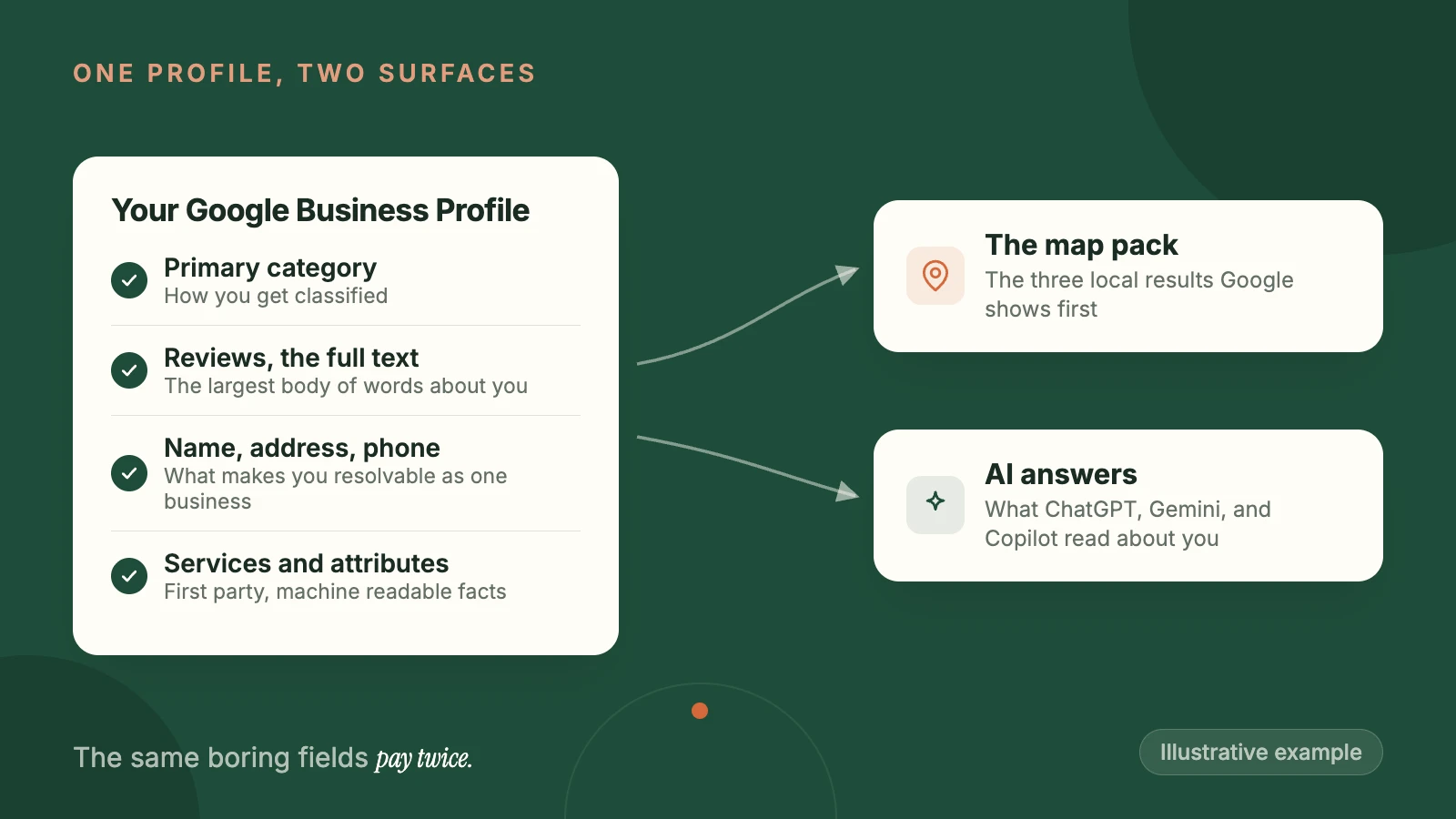
| Reviews (text, not just stars) | Documented prominence input | Highest | The largest body of text about you that any model will read |
| Name, address, phone | Core | High | Conflicting details make you unresolvable as one entity |
| Services and attributes | Relevance and filters | Medium | Structured, machine-readable, first-party facts |
| Description | No documented effect | Low | Rarely surfaced, but it is your own words about you |
| Photos | Contested, see above | Low | Models are not reading your van photos |
| Posts | No documented effect | Very low | Ephemeral, and archived after six months |
The point buried in that table is why this checklist is worth an afternoon. The fields above are not admin. They are the structured data an AI reads about you, which is the argument we make at length in SEO vs AEO vs GEO. Every boring row on this list now pays twice.
What About Bing Places and Apple?
Claim them. It takes twenty minutes total and virtually nobody does it.
This is missing from every competing checklist we read, which is odd, because Copilot’s web answers are grounded in Bing’s index. Microsoft documents Copilot sending a generated query to the Bing search service and composing its answer from what comes back. If Bing does not know you exist, one of the three major assistants cannot recommend you.
Bing Places lets you import straight from Google, so it is mostly a login and a confirmation. Apple Business Connect is the same story for anyone on an iPhone asking Maps or Siri.
Neither will move your Google ranking. That is not why you do them. You do them because your details need to agree everywhere, and because the cheapest AI visibility available is being present in the index the assistant reads. This is ordinary local SEO work that happens to have become AI work.
What Should You Ignore?
Five things you have definitely been told, none of which have a primary source. This is the section we would want to read.
“Post weekly and you will rank.” Google’s posts documentation makes no ranking claim at all. It frames posts as customer communication. The local ranking page does not mention posts. Posts are a merchandising surface: use them to say you are open on a holiday or that the schedule is filling up. They are not a lever, and Google no longer even exposes post performance through its API, which makes “our weekly posts are working” unprovable by construction.
“Geo-tag your photos.” This one is worth being rude about. Google’s photo documentation contains no reference to geo-tagging, EXIF, or image metadata of any kind. No Google source anywhere says image location data is read or used. It is one of the most durable pieces of nonsense in local marketing, and if someone is charging you for it, that tells you something about the rest of the invoice.
“Stuff your description with keywords.” Google’s guidance on descriptions is about honesty and quality. The ranking page never mentions descriptions. Compare that to categories, where Google says outright that the field affects ranking. One of those is a lever. The other is a sales page for humans.
“Use all ten category slots.” Contradicted by Google’s own words: “Use as few categories as possible to describe your overall core business.”
“Engagement signals decide the map pack.” Google names relevance, distance, and prominence. It has never said clicks, calls, or direction requests are ranking inputs. Experienced practitioners believe engagement matters, and they may well be right, but belief about a black box is not a mechanism you should be sold.
One more, on the AI side, because it is new enough that the myths are still forming. In June 2026 Google announced that owners can connect their Business Profile to Gemini. It is already being sold as an AI visibility feature. It is not. It is an owner-facing management assistant that drafts review replies and summarizes your feedback. Google makes no claim it affects how you appear in AI answers. It is also unavailable in the UK and across the European Economic Area, and it requires you to manage exactly one verified profile, which rules out most multi-location businesses.
How Do You Know It Worked?
Watch the Performance tab, and know what each number is not.
Google documents what it exposes: searches, views, directions, calls, website clicks, and more depending on your category. Three caveats that change how you read it:
- Calls are button taps, not conversations. “The number of times a customer clicked on the call button.”
- Views is not visibility. Google: “This metric only counts the views of your Business Profile and not the overall views of your business on Google.” It counts a person once a day.
- Searches update monthly, and can take up to five days to appear.
The Searches list is the screen worth your time. It shows the terms people used to find you. If they are all your business name, you are being found by people who already knew you. Unbranded terms climbing that list is what a category fix actually looks like from the inside.
Compare the same months a year apart, not this month against last. A December against a June in a seasonal trade is not a comparison, and every trade is more seasonal than its owner thinks.
Want someone to run this list against your profile and tell you which three things are actually costing you calls? That is a free local audit: 20 minutes, screen shared, no report to wait for. Or if you would rather it just got handled every week, that is what our Google Business Profile management service is.
Isaac founded Localplus to help local businesses in the US, UK & Canada get found in AI searches like ChatGPT, Gemini and Copilot. He's been working in the SEO space for over 15 years.


